We have all been in those meetings where someone asks for a new metric or a drill-down that seems simple in their heads (and it should be but the reality is very different for the Ops team).
Given how AI has brought all other organizational-knowledge at fingertips in seconds, the expectations from RevOps have become the same.
Why can’t we just ask the Hubspot AI? That’s a fair expectation now.
That is what Hubspot aims to solve through the Hubspot MCP.
And the promise is great.
At Petavue, we’ve been testing HubSpot’s new Model Context Protocol (MCP) across live GTM stacks, and here’s the short version — it works great for certain query-level use-cases and it doesn’t for analysis or cross-table ones.
MCP lets large language models (like GPT or Claude) securely reason over your HubSpot data in plain English.
But, can it pull insights, build reports, and even run analysis with full context and accuracy?
In this breakdown, we’ll share what we’ve learned from testing the Hubspot MCP inside real RevOps environments, what actually works, where the limits still are.
What Is the Model Context Protocol (MCP)?
Think of the Model Context Protocol (MCP) as a universal translator between AI systems and software applications.
It’s an open standard (originally introduced by Anthropic) that defines how an AI model — like ChatGPT or Claude — can talk to other apps in a consistent, structured, and secure way.
In traditional integrations, AIs “guess” how to call APIs or interpret data, often leading to inconsistent or insecure behavior. MCP removes that guesswork.
An MCP creates a shared language: the AI sends a request (for example, “Find all contacts created last week”), and the MCP translates it into an approved, structured action that the connected app, say, a CRM, can safely execute.
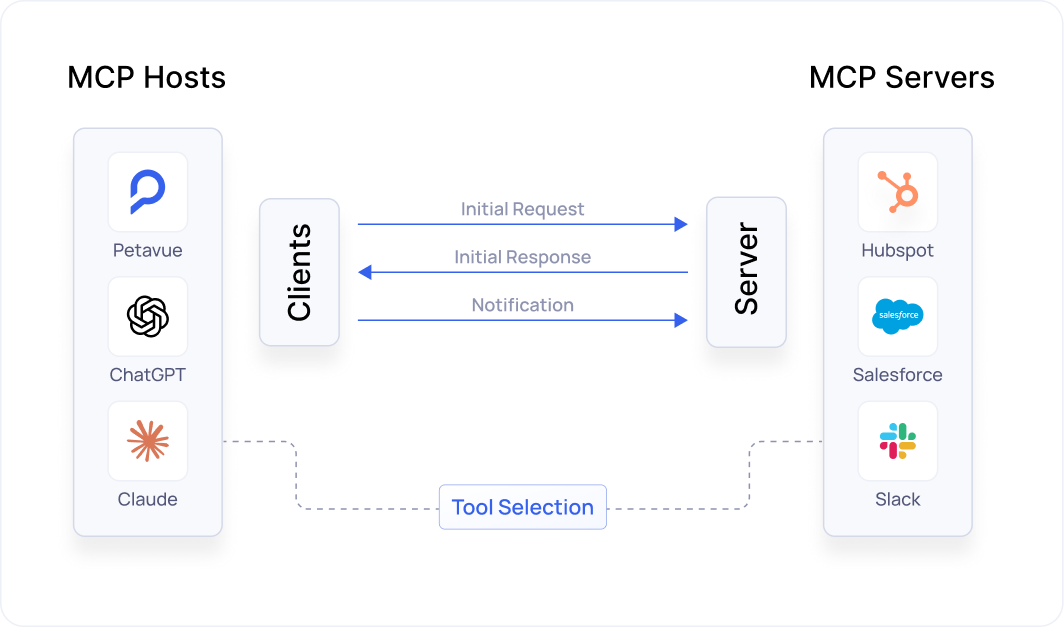
Each MCP setup has three key roles:
- The AI Host
- This is the model (e.g., ChatGPT or Claude) that’s trying to get something done.
- Example: You ask, “Show me this quarter’s pipeline coverage by region.” The AI interprets that as a task.
- The MCP Client
- This layer lives inside the AI’s environment. It converts the AI’s intent (“get pipeline coverage”) into a structured MCP request that can be safely understood by your CRM or BI system.
- Example: The client translates your question into a specific request like list deals grouped by region and stage.
- The MCP Server
- This sits on the app side (e.g., HubSpot, Salesforce, or Snowflake). It receives the structured request, runs the actual query, and returns the result in a standardized format.
- Example: The server executes the query, retrieves the live deal data from HubSpot, and sends it back to the AI in a clean, verified format the model can reason over.
What Is the HubSpot MCP?
HubSpot’s Model Context Protocol (MCP) makes it easy for AI tools to work safely with CRM data.
HubSpot runs an MCP server that acts as a controlled gateway between your CRM and any AI agent. Instead of giving the AI full API access, the server offers a set of predefined “tools,” such as listing contacts, retrieving deal details, or checking recent activity.
When a prompt like “Show me all deals created this week” comes in, the MCP server translates it into a verified request to HubSpot, executes it, and sends back clean, structured results the AI can use immediately.
HubSpot currently offers two versions:
- Remote MCP Server – the production-grade version that lets authorized AIs fetch real-time CRM data.
- Local Developer MCP – a CLI-based version for building and testing AI integrations.
For GTM and RevOps teams, the Remote MCP Server is the breakthrough. It lets AI agents safely interact with CRM data: run basic queries, pull live activity data, or pull campaign metrics — all within your governance rules.
Every MCP action is authenticated through HubSpot OAuth and limited to your defined scopes, meaning the AI can only do what you explicitly allow. Admins can log, audit, and monitor every action.
What Data Is Accessible Through HubSpot MCP?
As of the current public beta, HubSpot’s Model Context Protocol (MCP) server offers read-only access to a defined set of standard CRM and commerce objects. Here’s what’s inside that window.
Core CRM Data
These are the building blocks of any GTM system, and they’re all available through MCP:

Commerce & Transactional Objects
For GTM teams with connected revenue operations, MCP also unlocks HubSpot’s commerce layer namely; Products, Line Items, Quotes, Invoices, Orders, Carts, Subscriptions.
Object Relationships
One of MCP’s most powerful features is how it understands relationships between data objects.
You can ask:
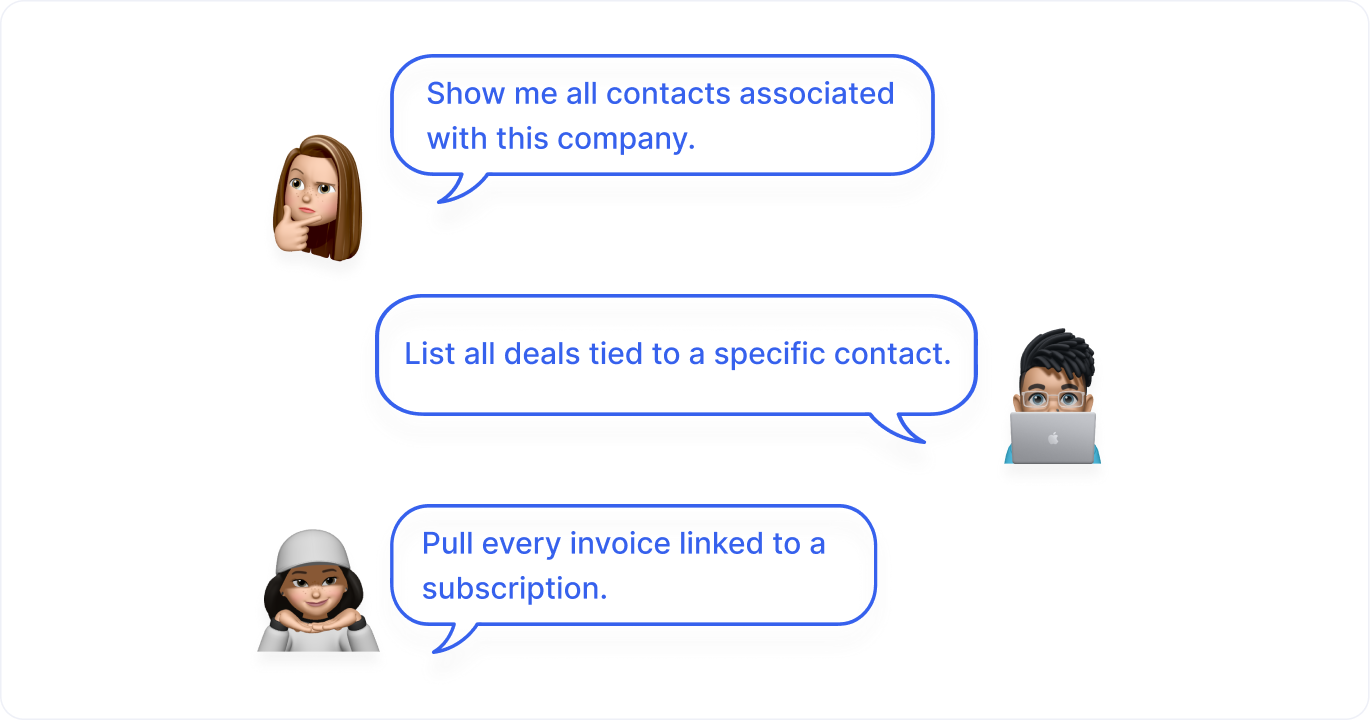
It knows how your CRM data is structured and can follow those connections automatically.
Governance & Boundaries
MCP is designed for control-first access. That means:
- All actions are read-only, the AI can’t create, edit, or delete CRM records.
- Sensitive fields (like health data or confidential identifiers) are automatically excluded.
- Custom objects and marketing analytics data aren’t supported yet.
- Every interaction is authenticated via HubSpot OAuth and scoped to the permissions you grant.
Admins can track, audit, and limit what the AI can see, making MCP safe for enterprise environments and compliance teams alike.
How to Set Up the HubSpot MCP Server (Step-by-Step)
Setting up your MCP server is surprisingly simple, even if you’re not a developer.
Step 1: Create a HubSpot Account and Private App
If you don’t already have one, start with a HubSpot CRM account (a free plan works for testing).
In your settings, go to Integrations → Private Apps → Create App. Give it a name like “MCP Integration” and note your access token; it’s the key that lets MCP talk to your data.
Step 2: Install Node.js
The MCP Server runs on Node.js. Visit nodejs.org and install the latest LTS version (v14 or higher).
Step 3: Clone the MCP Repository
Open your terminal and run:
git clone https://github.com/peakmojo/mcp-hubspot.git
cd mcp-hubspot
npm install
Step 4: Configure the Environment File
Create a .env file in your project’s root folder:
HUBSPOT_ACCESS_TOKEN=your-access-tokenStep 5: Start the MCP Server
Run:
npm startYou’ll see logs confirming the server is running locally at http://localhost:3000.
Step 6: Connect Your AI Assistant
In Claude or ChatGPT, go to Settings → Integrations → Add Custom Tool.
Enter your MCP Server URL (local or hosted) and the access token.
Then test it:
“Retrieve contact info for Jane Doe at Acme Corp.”
If it responds instantly — congratulations. You’ve just given your AI direct access to your CRM.
Pro Tip: Use a sandbox environment before going live, especially if your CRM contains sensitive data.
What MCP Enables for GTM Reporting
Real-time, natural-language queries
HubSpot’s Model Context Protocol (MCP) gives AI assistants live access to CRM data through conversational queries. GTM teams can ask questions like, “What were our total closed-won deals this quarter by source?” and get immediate, data-driven answers without needing SQL or API calls.
Because MCP interprets natural language, anyone (marketers, sellers, or ops teams) can explore metrics directly. The AI automatically converts plain-language requests into the right HubSpot API operations, making ad hoc reporting faster, more intuitive, and far more accessible for non-technical users.
MCP shines for quick, interactive exploration of live data. It reduces the lag between curiosity and insight and helps teams make data-informed decisions without depending on analysts or BI tools for every request.
Practical Considerations When Using HubSpot MCP for Reporting
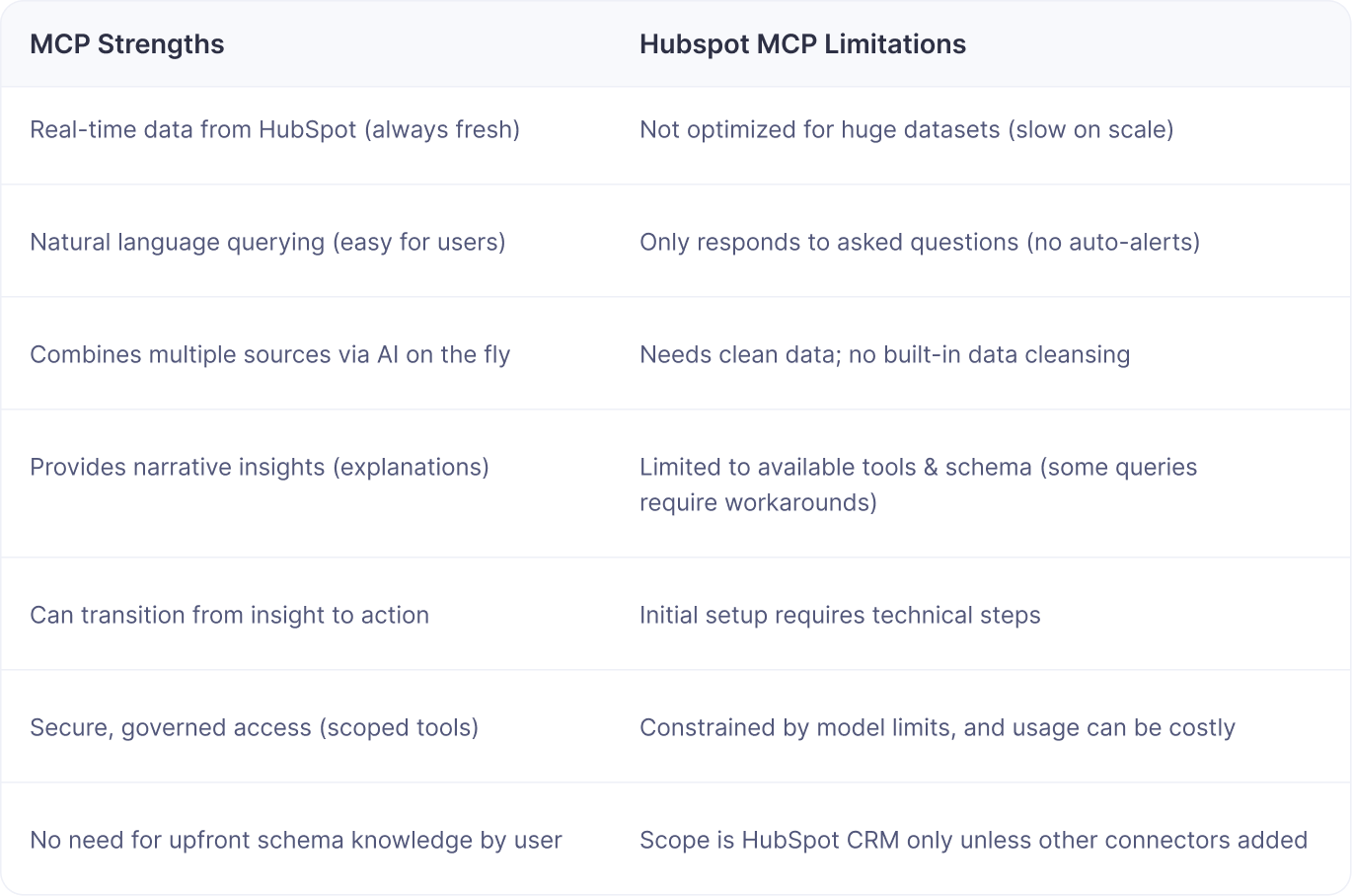
While MCP unlocks a flexible and accessible way to interact with HubSpot data, it is not a full replacement for a complete reporting stack. Teams should be aware of several important trade-offs.
Performance and scale
MCP streams live data directly from HubSpot rather than warehousing it. This design is ideal for lightweight queries or smaller datasets but not for high-volume reporting. Large CRM exports or marketing data exceeding tens of megabytes can slow responses or exceed model limits. For large-scale, repeated analytics such as quarterly pipeline reviews or campaign attribution modeling, traditional BI or warehouse-based solutions remain better suited.
Reactive, not proactive
AI connected through MCP is prompt-driven. It answers questions in real time but does not monitor or alert automatically. To detect anomalies like drops in conversion rates, teams still need dashboards or alerting systems. MCP works best as an exploratory or diagnostic layer that complements, rather than replaces, proactive reporting frameworks.
Data scope
HubSpot MCP focuses on HubSpot data. Many GTM metrics depend on cross-system context such as ad spend, product usage, revenue recognition, or customer success signals.
Setup and maintenance
Deploying MCP requires some technical setup: configuring private apps, tokens, and permissions. Once connected, it is stable and powerful, but the initial configuration can be developer-heavy compared to plug-and-play SaaS integrations.
Cost and model limits
Each query consumes AI tokens, and large datasets can exceed model context windows, requiring summarization. For most GTM teams, that is manageable, but at enterprise scale, token consumption and query complexity can influence both performance and cost efficiency.
Key Takeaway
HubSpot’s MCP is an excellent bridge between natural-language AI and operational CRM data. It democratizes access to insights and accelerates ad hoc analysis, especially for fast-moving GTM teams.
However, for very large-scale data analysis, scheduled KPI monitoring, or heavily governed reporting processes, MCP alone may fall short. In those areas, you need an AI-platform dedicated to the RevOps workflow (subtle promotion for Petavue (wink!)
Our findings from testing the Hubspot MCP in real-life environment
To understand how HubSpot’s MCP performs in a real environment, we ran a controlled test. We connected a HubSpot test instance containing roughly 1,200 contacts and 831 deals to Claude AI through the HubSpot MCP. The goal was to evaluate two things: how accurately the assistant could analyze live CRM data, and how effectively MCP handled larger datasets during real-time reporting.
Once connected, Claude began retrieving deal data directly through MCP. The assistant fetched data in batches of 200 records at a time, then continued with offset-based queries to pull additional batches. It then loaded the retrieved data into memory, processed it with a lightweight JavaScript layer, and generated an analytical summary in plain language.
At first, this worked as expected for quick data exploration. However, the assistant began drawing conclusions about the full dataset after analyzing only a sample—often 300 or 600 out of 831 deals—without clarifying that its insights were based on partial data. When prompted to confirm, it acknowledged the limited scope but still repeated the same sampling approach in subsequent runs.
This revealed a core limitation in how MCP-driven AI models handle CRM data. While they can summarize and interpret structured information, their responses are constrained by how much data can fit into memory and token limits. The assistant may sound confident but is often working with incomplete context.
Architectural Implications of using Hubspot MCP for RevOps
MCP streams live HubSpot data into the AI model’s context rather than storing or pre-aggregating it. This approach keeps integration lightweight but limits scalability. Once dataset size grows beyond a few hundred rows, latency increases and context windows cap out, forcing the AI to summarize or truncate data.
For small datasets or simple filters—such as “show me deals created last week” or “list deals owned by Jane”—MCP performs well. For high-volume analysis—like full-pipeline metrics, win-rate analysis by stage, or historical performance trends—it quickly runs into performance and accuracy limits.
The lesson is straightforward. MCP is powerful for interactive exploration of live HubSpot data, offering flexibility and immediacy for day-to-day GTM use. But it is not built for full-scale analytics. To ensure completeness and accuracy, it should be paired with a dedicated reporting or warehouse layer that can process larger datasets reliably.
What would make a RevOps AI reliable for analysis?
These tests made one thing clear: even when the connection works perfectly, confidence in the output depends on how much visibility the user has into what the AI actually did. When AI systems can query live CRM data, they answer quickly, but rarely show the steps behind the answer. That gap between speed and traceability is where most RevOps teams begin to hesitate.
The real test for an MCP that enables AI-powered reporting and analysis for RevOps teams isn’t just data access, it’s verification. Once RevOps teams start using AI for operational reporting, the harder problem becomes ensuring every number is reproducible and explainable.
The more conversations we have with GTM ops teams there is a clear pattern emerging: access alone isn’t enough. AI needs structured context, and teams need confidence in how metrics are formed.
The most effective implementations pair real-time querying with a transparent verification layer that defines the plan before analysis, validates each step of execution, and explains the logic behind every result. That’s what transforms AI reporting from a fast curiosity into a dependable source of truth.
In Summary: The Hubspot MCP for RevOps
HubSpot’s Model Context Protocol represents a meaningful step toward truly conversational access to CRM data. In practice, it shines for ad hoc exploration: asking quick, context-rich questions and getting answers instantly, without building dashboards or writing SQL.
The takeaway for RevOps leaders is clear: use MCP to empower teams to explore live data safely, but anchor your analytics foundation in systems built for depth and continuity.
But MCP’s current form is more bridge than destination. It handles snapshots of CRM data elegantly, yet falls short when scale, historical completeness, or multi-system joins come into play.
For now, it’s best understood as an augmentation layer, a way to democratize insight and speed up operational curiosity but not for scaled up, reliable reporting and analysis. You need tools built specifically for that (cue: Petavue).